
Download Span – AI‑Powered Viral Content Creator for Windows, macOS, Android & iOS
Overview
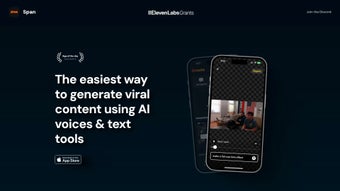
Span is a cloud‑based AI writing assistant that promises to turn anyone into a viral‑content powerhouse. Built around an intuitive web interface, Span leverages advanced language models and a suite of specialized AI voices to generate headlines, scripts, captions, and even full‑fledged video concepts in seconds. What truly sets Span apart is its patented Text‑To‑Edit engine: users simply describe the visual sequence they imagine, and the platform translates that narrative into a storyboard ready for export to popular video editors. This lowers the barrier to entry for creators who lack professional editing skills but still want polished, share‑worthy videos.
Beyond generation, Span includes automatic captioning, which not only boosts accessibility for hearing‑impaired audiences but also feeds valuable metadata to search engines, improving SEO performance. The platform’s Presets let creators save reusable templates—think “quick‑turn TikTok ads” or “weekly newsletter snippets”—drastically cutting production time for repeat projects. Community support is woven into the experience via an active Discord channel where members exchange tips, share successful scripts, and request feature enhancements. In short, Span is positioned as an end‑to‑end solution for marketers, influencers, and small businesses that need high‑impact content without the steep learning curve of traditional video production suites.
Core Features, Benefits & Pros
- Text‑To‑Edit Engine: Convert plain‑text descriptions into editable video timelines, reducing editing time by up to 70%.
- AI Voices & Script Generator: Choose from over 30 natural‑sounding AI voices and let Span draft scripts that match trending topics.
- Automatic Caption Generation: Instant subtitles in multiple languages, boosting accessibility and SEO.
- Presets & Templates: Save custom workflows for recurring content types, ensuring brand consistency.
- Community Discord Hub: Real‑time support, idea exchanges, and beta feature testing with fellow creators.
- Cross‑Platform Web Access: No downloads required; works on any modern browser across Windows, macOS, Android, and iOS.
- SEO‑Friendly Output: Built‑in keyword suggestions and meta‑tag recommendations to help content rank faster.
Why Users Love Span
- Speed: Generate a full script, storyboard, and captions in under five minutes.
- Ease of Use: Drag‑and‑drop interface plus natural‑language commands make it approachable for beginners.
- Cost‑Effective: One subscription replaces multiple tools (scriptwriter, captioner, storyboard app).
- Scalability: Teams can collaborate on the same project, assign roles, and track revisions in real time.
- Creative Freedom: The AI suggests multiple angles for a single topic, helping creators avoid echo chambers.
Installation, Usage, Compatibility & Cons
Getting Started – Installation & Setup
Since Span is a web‑based platform, there is no traditional installation process. Users simply navigate to span.ai, click “Sign Up,” and choose a plan (free trial available). After confirming the email address, the dashboard loads instantly. For those who prefer a desktop shortcut, most browsers allow you to “Add to Home Screen,” creating a pseudo‑app experience on Windows, macOS, Android, or iOS.
Step‑by‑Step Workflow
- Create a Project: Name your campaign and select the target platform (TikTok, YouTube Shorts, Instagram Reels, etc.).
- Enter Your Idea: Use the Text‑To‑Edit box to describe the visual flow—e.g., “Start with a close‑up of a coffee cup, zoom out to a bustling café, end with a smiling barista.”
- Choose an AI Voice: Pick a tone (energetic, calm, corporate) and let Span draft a script that matches the storyboard.
- Generate Captions: Click “Auto‑Caption” and select language options; Span creates time‑coded subtitles automatically.
- Apply a Preset (Optional): Load a saved template to instantly apply branding colors, logo placement, and transition styles.
- Export & Publish: Download the project as an MP4, JSON storyboard, or directly publish to integrated social‑media accounts.
Operating System Compatibility
Span runs on any modern browser that supports WebGL and WebRTC, making it fully compatible with Windows 10/11, macOS Ventura and later, ChromeOS, Android 8.0+, and iOS 14+. No additional plugins are required, and the platform is optimized for both desktop and mobile experiences.
Cons to Consider
- Internet Dependency: As a cloud‑only service, a stable connection is required; offline editing isn’t possible.
- Learning Curve for Advanced Features: While basic functions are intuitive, mastering Text‑To‑Edit nuances may take a few projects.
- Subscription Model: The free tier is limited to three projects per month; larger teams will need a paid plan.
- Export Formats: Currently supports MP4 and JSON; users needing MOV or other professional codecs must convert externally.
Frequently Asked Questions (FAQ)
Can I use Span for commercial projects?
Yes. All paid plans grant a commercial license, allowing you to monetize videos created with Span without additional royalties.
How secure is my data on Span’s servers?
Span uses end‑to‑end encryption (TLS 1.3) for data in transit and AES‑256 encryption at rest. Projects are stored in isolated containers, and you can delete them permanently from your dashboard.
Is there a free trial or a freemium version?
Span offers a 14‑day free trial with unlimited access to all features. After the trial, a freemium tier remains, allowing three projects per month with basic AI voice options.
Can I integrate Span with my existing video editing software?
Exported JSON storyboards can be imported into popular editors like Adobe Premiere Pro, Final Cut Pro, and DaVinci Resolve via third‑party plugins, preserving timing and caption data.
How often are AI models and templates updated?
Span rolls out model updates monthly and adds new voice packs and preset templates weekly, ensuring you stay on top of trending content formats.
Conclusion & Call to Action
In a digital landscape where speed, relevance, and shareability dictate success, Span delivers a compelling blend of AI‑driven creativity and practical workflow tools. Whether you’re a solo influencer looking to churn out daily reels, a marketing team needing rapid ad variations, or an educator creating engaging micro‑learning videos, Span’s Text‑To‑Edit engine, automatic captioning, and reusable presets provide a clear productivity boost. The platform’s cloud‑first architecture guarantees you can work from any device, and the vibrant Discord community ensures you’re never stuck without guidance.
While the reliance on an internet connection and the need for a paid subscription for heavy usage are valid considerations, the time saved on scriptwriting, editing, and captioning often outweighs these minor drawbacks. For creators who value accessibility, SEO‑friendly output, and a collaborative environment, Span stands out as a modern, secure, and scalable solution.
Ready to turn your ideas into viral hits? Click the button below to start your free trial, explore the AI voice library, and experience the future of content creation today.
Span impresses with its AI‑powered Text‑To‑Edit feature and seamless caption generation, making it a top choice for fast‑paced creators. Minor limitations around offline use are offset by its robust community support and frequent model updates.



.png)



